Your IPTV UK.
Ready to set up.

Find your device and follow the screenshots below. We recommend IBO Player Pro, with its paid licence included free with your British IPTV subscription. Prefer another player? We can help with that too.

  • Free IBO Player Pro licence
  • Step-by-step screenshots
  • Setup help included

Three steps.
Then you’re ready.

From picking your player to opening your first channel, here’s how setup works.

  1. 1

    Choose your IPTV app

    We recommend IBO Player Pro, with its paid licence included in your subscription. Prefer TiviMate, IPTV Smarters or another player? You can use those too.

  2. 2

    Send us your details

    Open the app and note its MAC Address and Device Key. Send the details or a clear photo to our team. For another player, we’ll supply your Xtream Codes login instead.

  3. 3

    Start watching

    Once our team confirms activation, reopen the app. Your IPTV UK subscription gives you access to 25,000+ live channels and 190,000+ movies and series.

Your IBO Player Pro licence
is included.

IBO Player Pro’s full licence normally costs extra. We activate the paid licence on your device free with your British IPTV plan, so there’s no separate app payment to arrange.

Order Your IPTV UK

The IPTV UK apps
we recommend.

Your subscription works with the popular IPTV players. These are the three we’re asked about most.

TiviMate app iconAndroid TV & Firestick

TiviMate

A familiar guide for your television

A well-organised channel guide with smooth navigation. Works with your IPTV login through Xtream Codes. The premium upgrade is a separate purchase.

  • EPG and multiview
  • Xtream Codes ready
  • Suited to Android TV boxes
IPTV Smarters Pro app iconAlso supported

IPTV Smarters Pro

Keep the player you already know

If you already use IPTV Smarters and prefer its layout, you can keep it. Our team will provide the login details for your subscription.

  • Simple and familiar
  • Works with your plan
  • Setup help included

Whichever app you prefer, setup help comes with your British IPTV subscription.

Install IBO Player Pro
on your device.

Choose your device for the full instructions. Follow the steps in order and use the screenshots to check your progress.

Amazon Firestick

Most popular IBO Player Pro About 5 mins

IBO Player Pro is installed on Firestick using the free Downloader app. Follow the download, installation and activation steps below.

Part 1 · Download IBO Player Pro
1

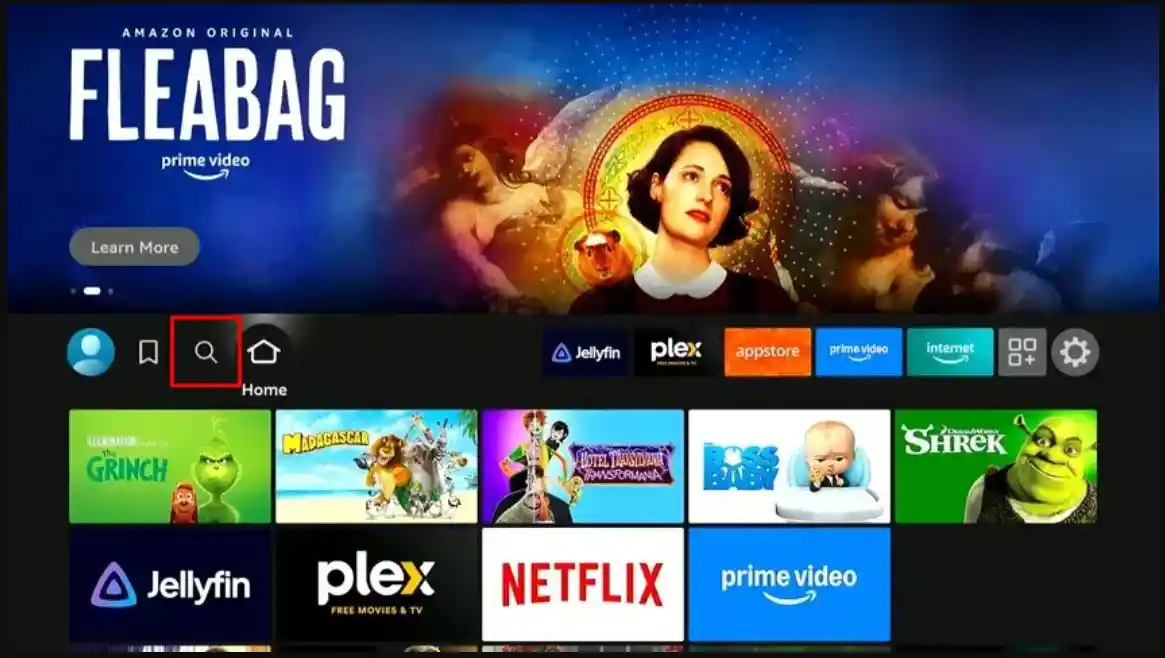
Navigate to Find

From the Firestick home screen, navigate to the Find option using your remote.

Firestick home screen with the Find option highlighted
2

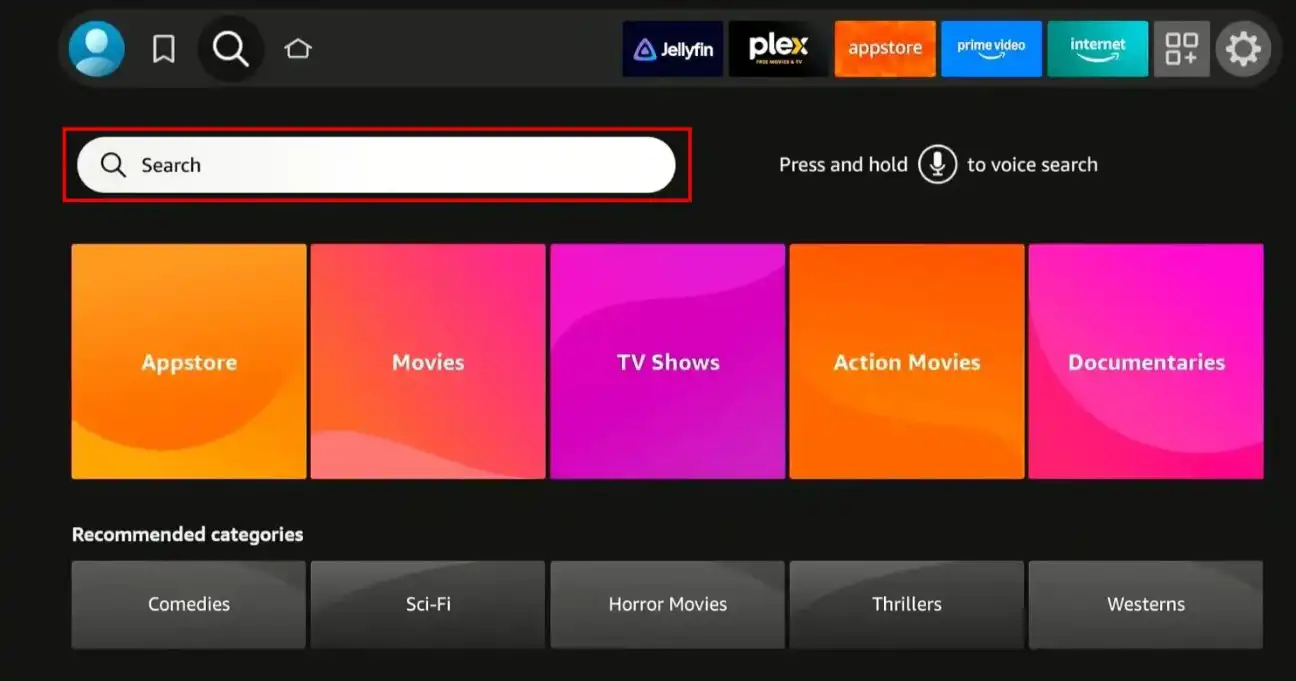
Open Search

Select Search to open the Firestick search bar.

Firestick Find menu with Search selected
3

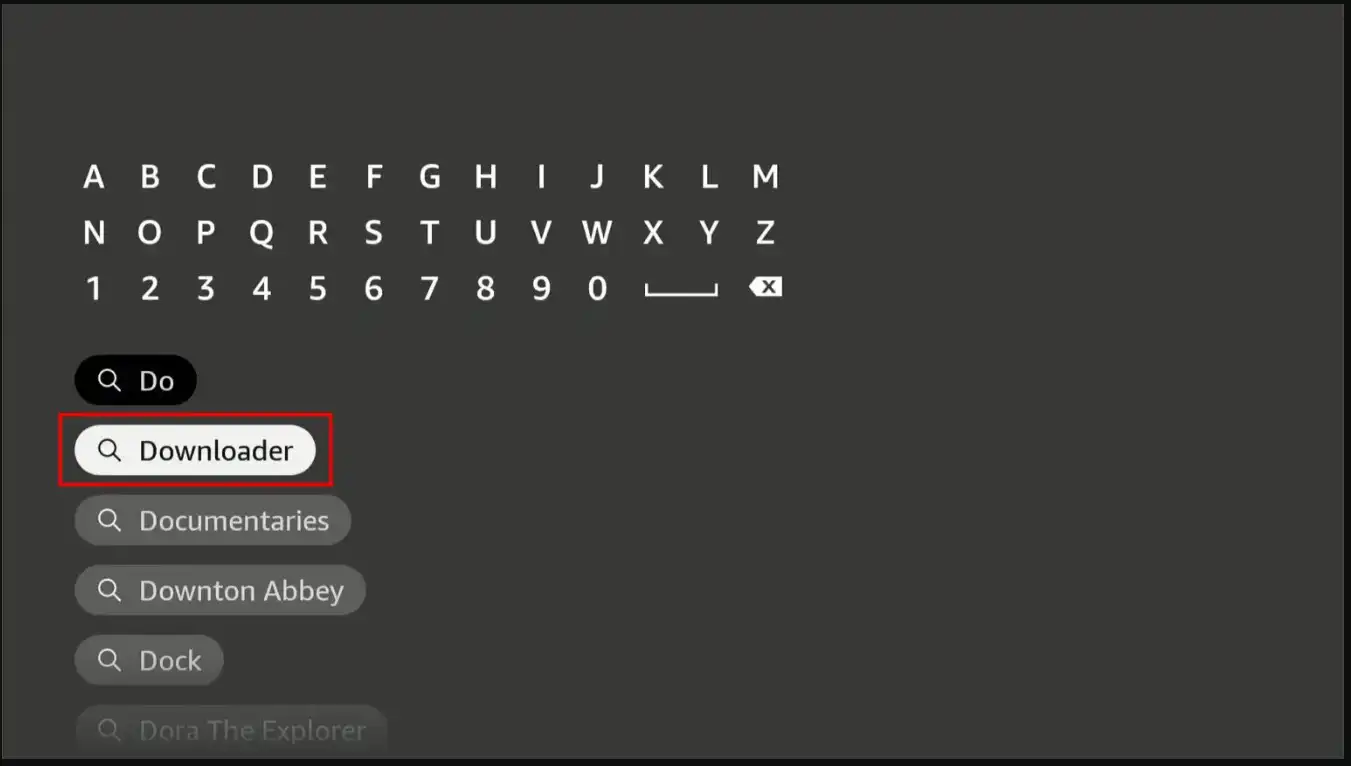
Search for Downloader

Type Downloader in the search bar. This is the free tool we’ll use to install IBO Player Pro on your Firestick. Download and install it.

Firestick search results showing the Downloader app
4

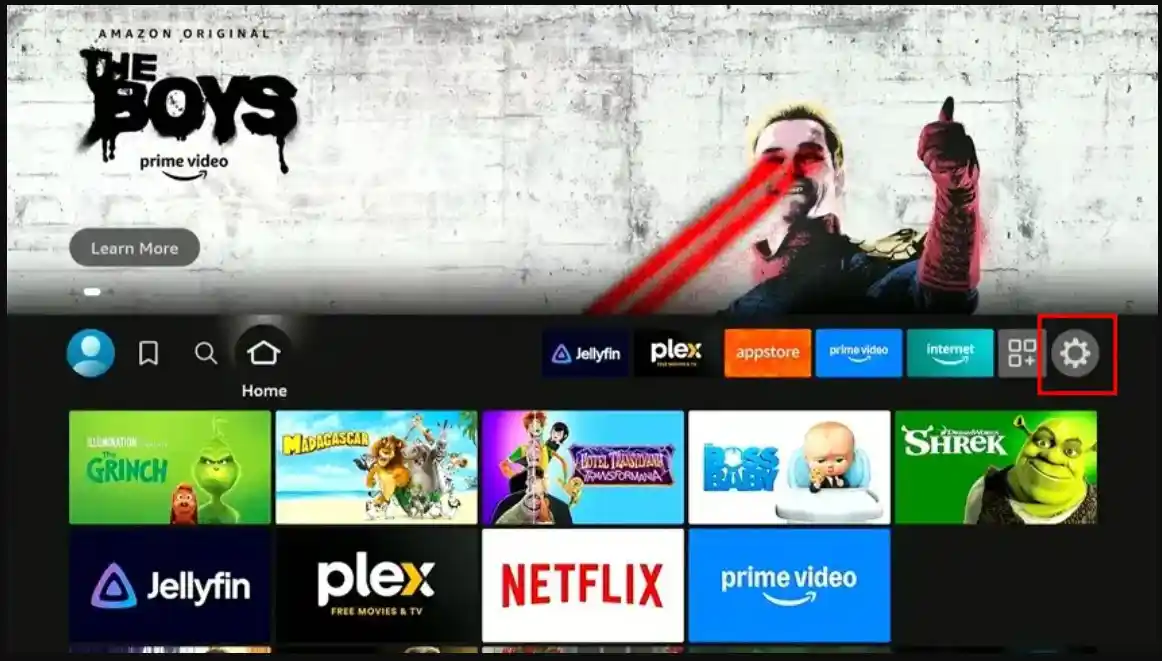
Open Settings

Go back to the Firestick home screen and open Settings from the top menu.

Firestick home screen with the Settings gear highlighted
5

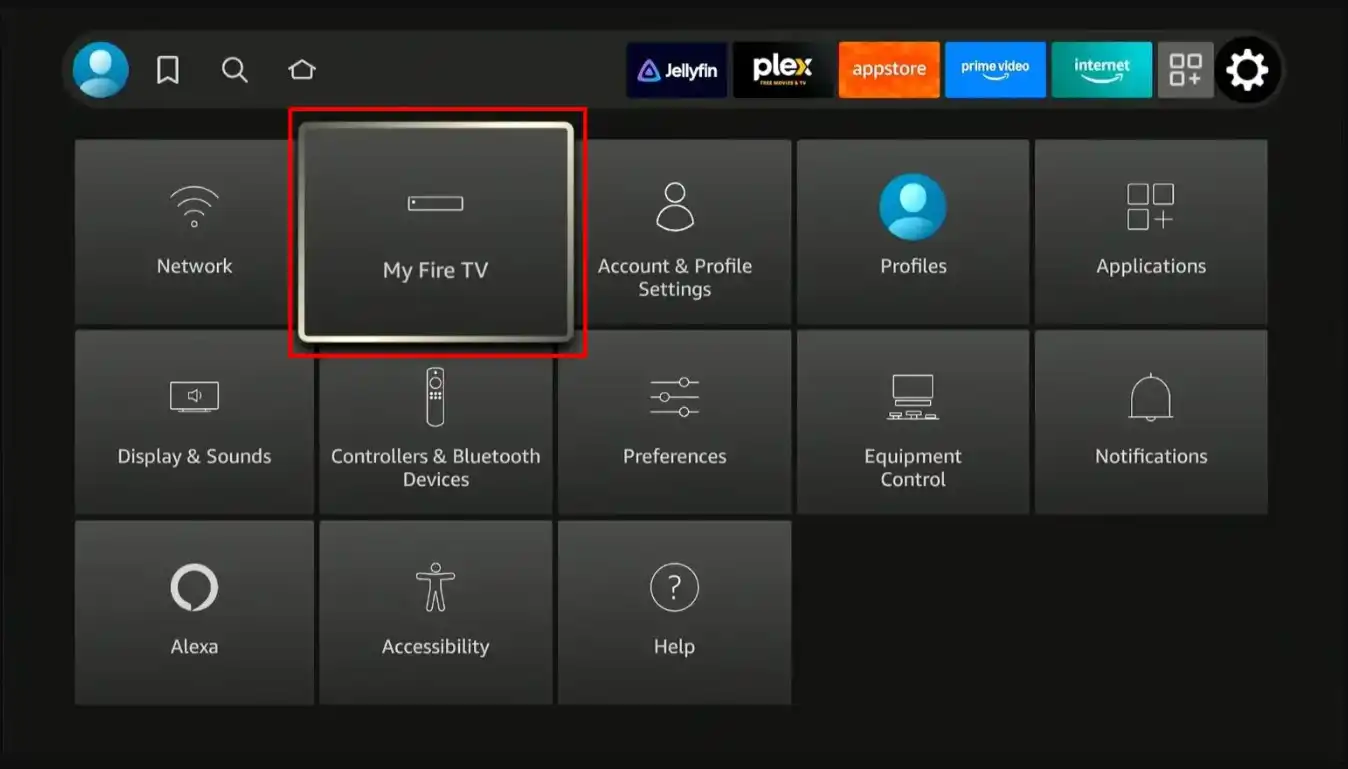
Open My Fire TV

Inside Settings, scroll to My Fire TV and select it.

Firestick Settings menu with My Fire TV highlighted
6

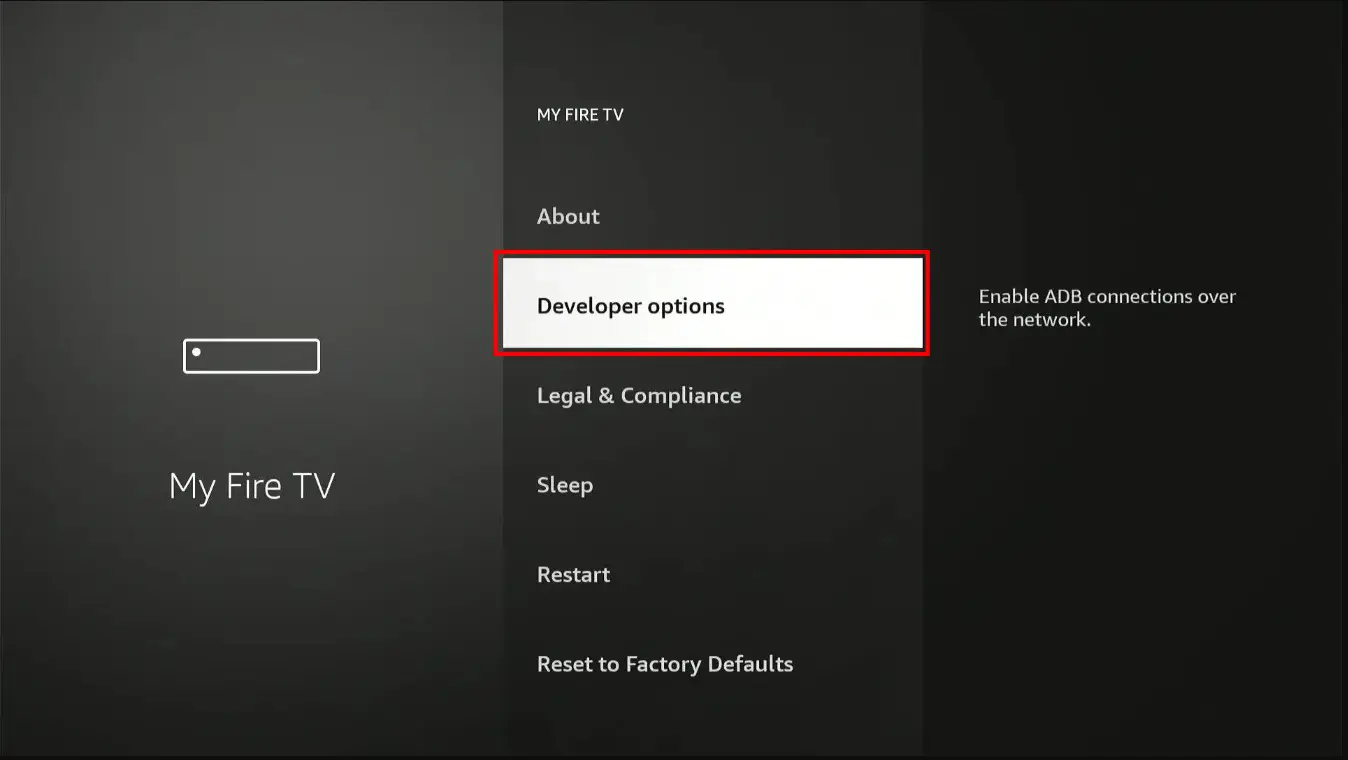
Open Developer Options

Select Developer Options from the list.

Can’t see Developer Options? Go to Settings, open My Fire TV, then About, and click on your Fire TV Stick name 7 times. This will unlock Developer Options.

My Fire TV menu with Developer Options highlighted
7

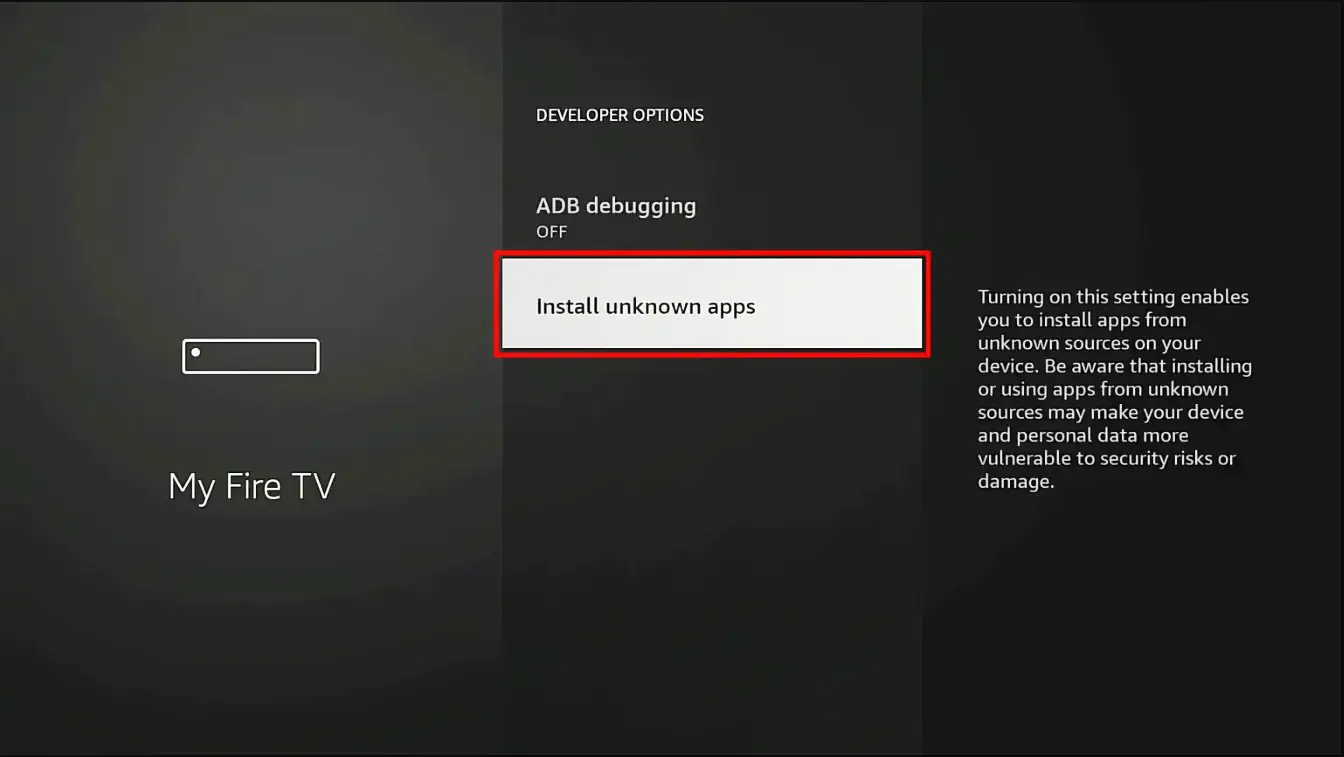
Allow Unknown Apps

Select Install Unknown Apps from the Developer Options menu.

Older Firestick interface? If you’re on an older version, this option may be called Apps from Unknown Sources instead.

Developer Options with Install Unknown Apps highlighted
8

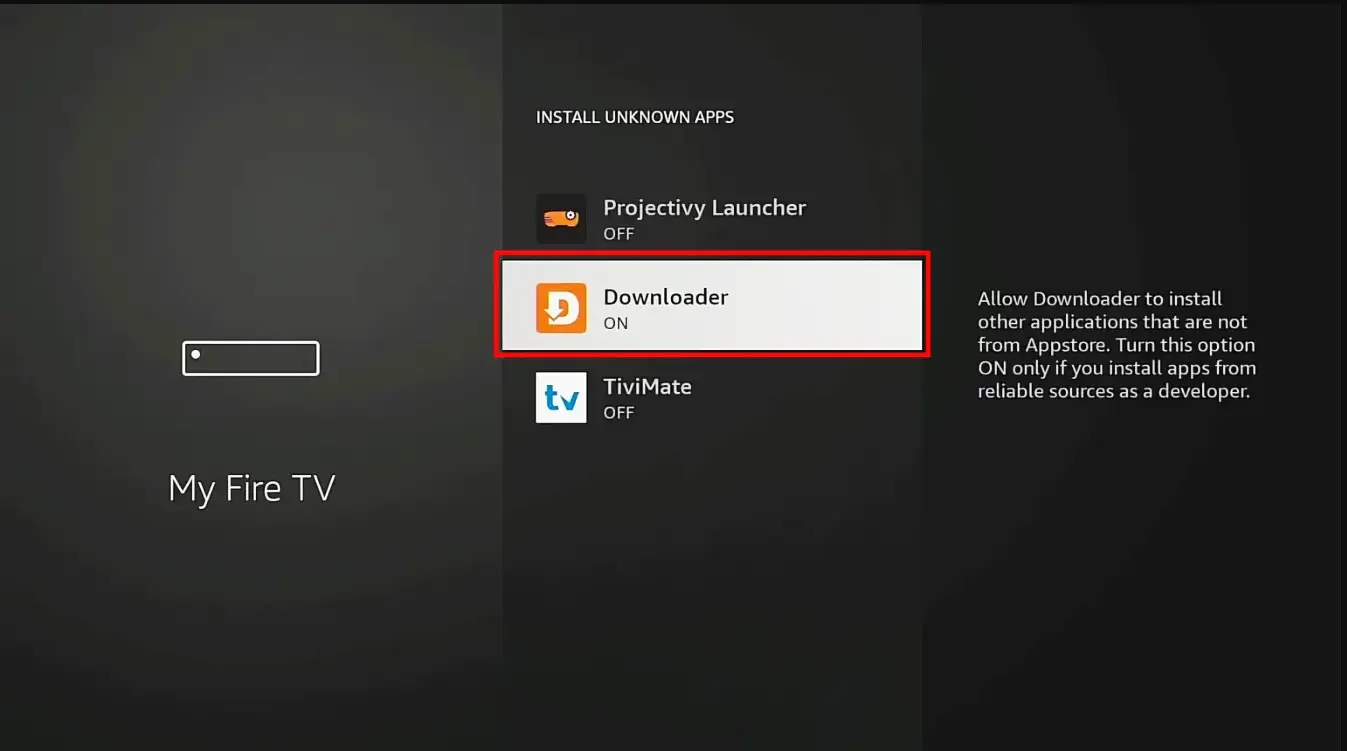
Enable for Downloader

Find the Downloader app in the list and toggle it ON. This allows Downloader to install apps on your Firestick.

Install Unknown Apps list with Downloader toggled on
Part 2 · Install IBO Player Pro
9

Open Downloader

Launch the Downloader app. If any prompts appear on first launch, dismiss them. When you see the main screen, tap the URL text field.

10

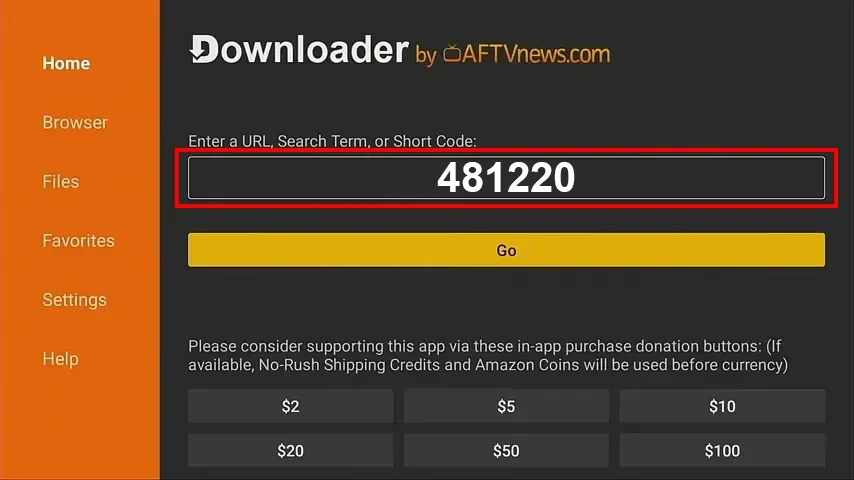
Enter the Code

Using the on-screen keyboard, type one of these Downloader codes:

481220or834339

Then press OK or Go to start the download.

Downloader app with the code entered in the URL field
11

Install the App

Wait for the IBO Player Pro file to download. Once finished, Downloader will automatically prompt you to install. Tap Install, then Open when the installation is complete.

Part 3 · Activate Your Subscription
12

Send Us Your Details

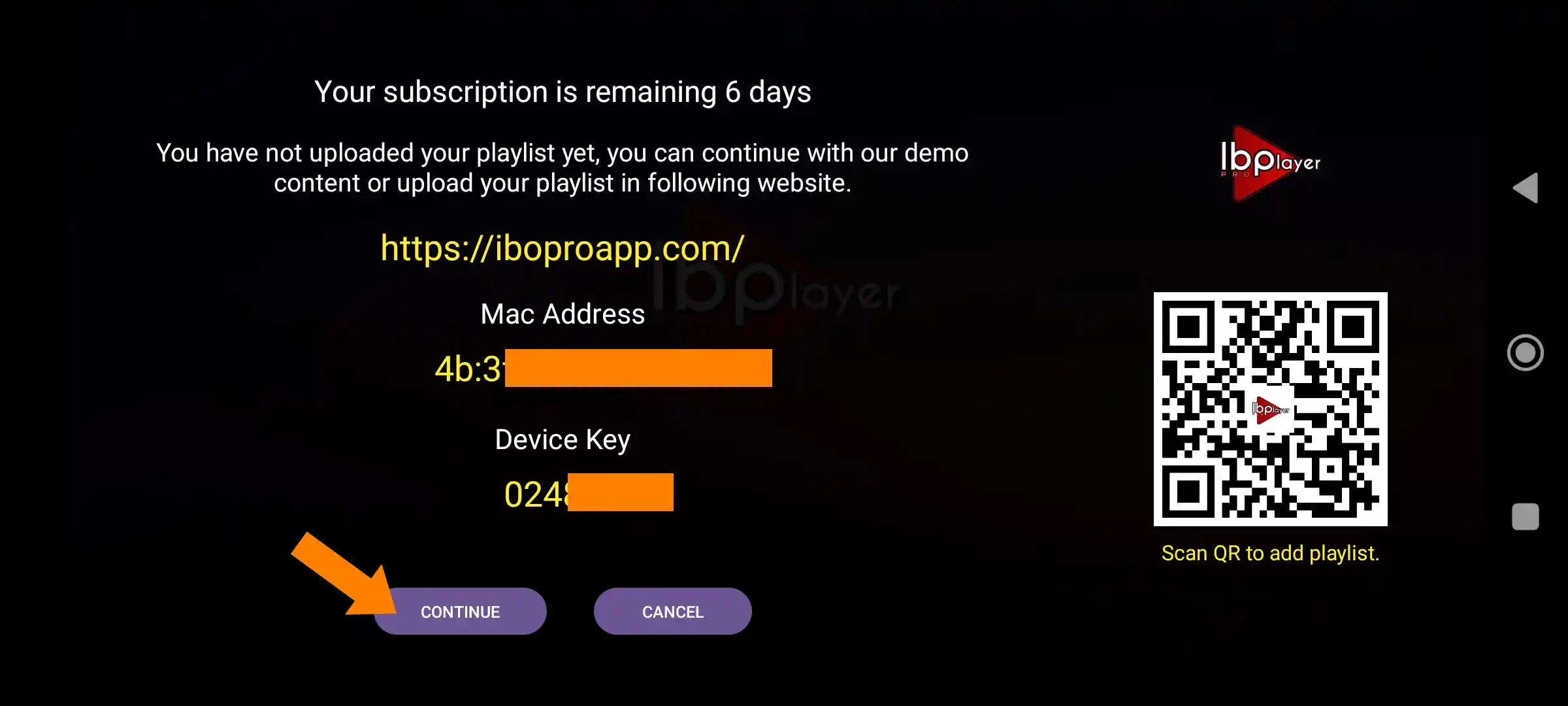
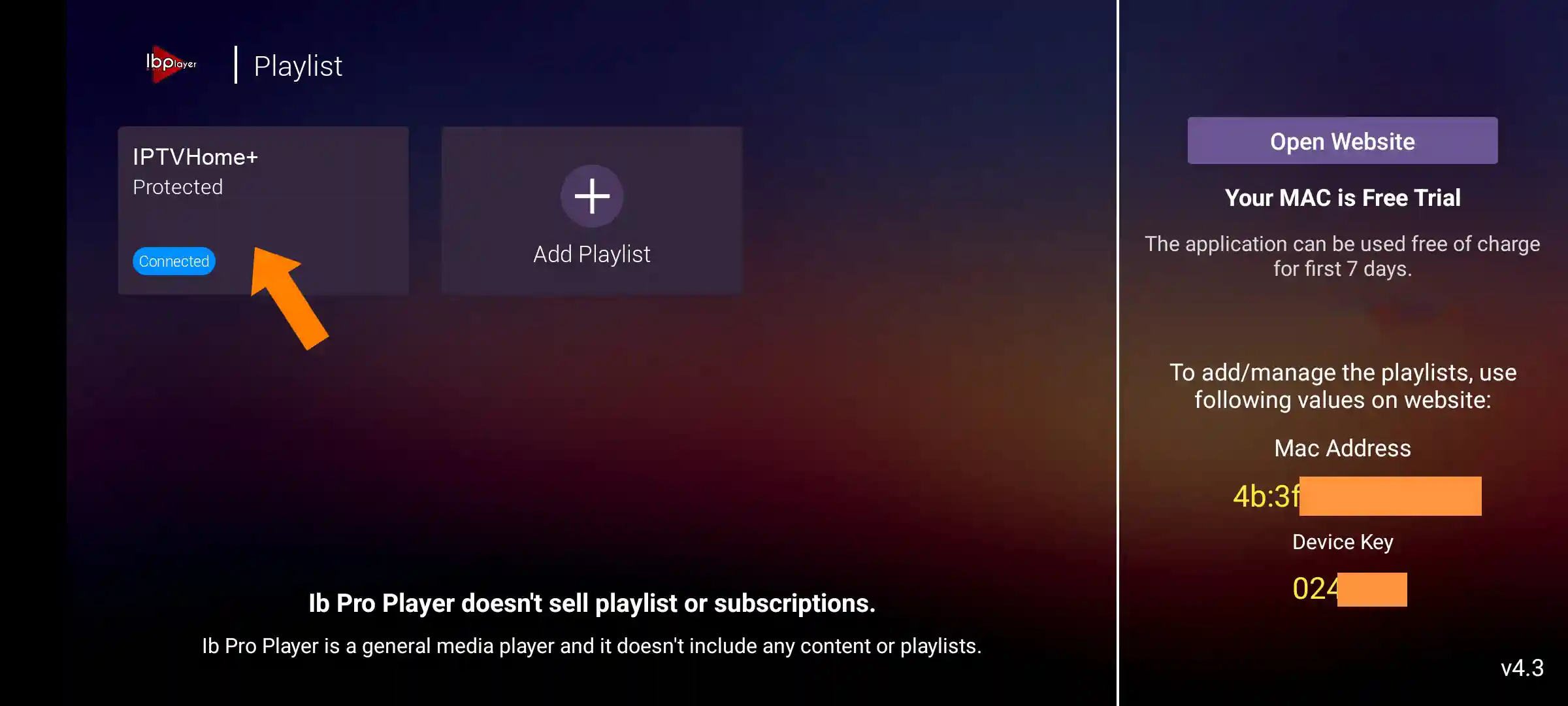
When IBO Player Pro opens for the first time, a popup will display your MAC Address and Device Key. Send those details to us on WhatsApp or by email, you can type them out or just snap a photo of the screen. Our team will activate your IPTV UK subscription remotely.

IBO Player Pro popup showing the MAC Address and Device Key

Prefer to set it up manually? You can also enter your Xtream Codes credentials yourself. But for a smooth, guaranteed activation, we recommend letting our team handle it.

Android: Phones, TVs & Boxes

Play Store About 3 mins
1

Open the Play Store

On your Android device (phone, tablet, Android TV or Android box), open the Google Play Store and search for IBO Pro Player. Download and install it.

Direct link to Play Store

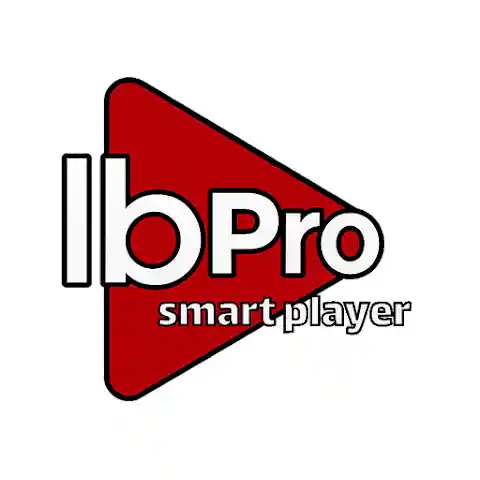
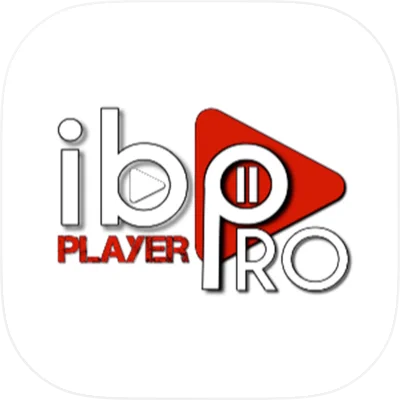
Important: there are several apps with similar names. Make sure you install the correct, original IBO Player app, it should look like the icon shown here.

Official IBO Pro Player icon on the Play StoreThis is the official icon to look for in the Play Store.
2

Open & Note Your Details

Launch IBO Player Pro. A popup will show your MAC Address and Device Key. Send them to us on WhatsApp or by email, type them out or snap a photo of the screen. Our team will activate your uk iptv subscription remotely.

Prefer to set it up manually? You can also enter your Xtream Codes credentials yourself. But for a smooth, guaranteed activation, we recommend letting our team handle it.

iOS: iPhone, iPad, Apple TV & Mac

App Store About 3 mins
1

Open the App Store

On your iPhone, iPad, Apple TV or Mac, open the App Store and search for IBO Pro Player. Download and install it.

Direct link to App Store

Important: multiple apps use similar names. Make sure you download the correct, original version, check the icon matches the one shown here.

Official IBO Pro Player icon on the App StoreThis is the official icon to look for in the App Store.
2

Open & Note Your Details

Launch IBO Player Pro. A popup will show your MAC Address and Device Key. Send them to us on WhatsApp or by email, type them out or snap a photo of the screen. Our team will activate your subscription remotely.

Prefer to set it up manually? You can also enter your Xtream Codes credentials yourself. But for a smooth, guaranteed activation, we recommend letting our team handle it.

Samsung Smart TV

Samsung Apps About 3 mins
1

Open Samsung Apps

On your Samsung Smart TV, open the Samsung Apps store and search for IB Player Pro. Download and install it.

Important: several apps have similar names. Make sure you install the original IBO Player Pro, check the icon matches the one here.

Official IBO Player Pro icon on Samsung AppsThis is the official icon to look for on Samsung Apps.
2

Open & Note Your Details

Launch the app. A popup will display your MAC Address and Device Key. Send them to us on WhatsApp or by email, you can type them out or snap a photo of the screen. Our team will activate your subscription remotely.

Prefer to set it up manually? You can also enter your Xtream Codes credentials yourself. But for a smooth, guaranteed activation, we recommend letting our team handle it.

LG Smart TV

LG Content Store About 3 mins
1

Open LG Content Store

On your LG Smart TV, open the LG Content Store (or LG Apps) and search for ibPlayer Pro. Download and install it.

Direct link to LG Content Store

Important: multiple apps use similar names. Make sure you download the original version, the icon should match the one shown here.

Official ibPlayer Pro icon on the LG Content StoreThis is the official icon to look for on the LG Content Store.
2

Open & Note Your Details

Launch the app. A popup will display your MAC Address and Device Key. Send them to us on WhatsApp or by email, you can type them out or snap a photo of the screen. Our team will activate your subscription remotely.

Prefer to set it up manually? You can also enter your Xtream Codes credentials yourself. But for a smooth, guaranteed activation, we recommend letting our team handle it.

Hisense Smart TV

Search: IB Player About 5 mins

Hisense TVs use different operating systems and app stores. Follow only the section for your model. Search for IB Player, not IBO. If you are unsure which system your TV uses, ask our team for help.

If yours runs Google TV / Android TV
1

Open the Play Store

Press the Home button on your Hisense remote, go to the Apps section and open the Google Play Store (on some models it’s called Get More Apps). You’ll need a stable internet connection and a Google account signed in.

2

Search for IB Player

Select the Search icon at the top and type IB Player. Pick the correct, original app from the results and click Install.

Official IB Player icon on the Play StoreThis is the official icon to look for.
3

Launch it

Once the download completes, select Open, or find the app later in your main Apps row.

If yours runs VIDAA OS
1

Open the VIDAA App Store

Press Home on your remote, scroll down and select the App Store (or My Apps, then App Store). VIDAA models don’t use Google Play, they have their own built-in store.

2

Search for IB Player

Use the Search bar at the top and type IB Player. Highlight the app, press OK, then choose Install.

Good to know: VIDAA doesn’t support sideloading or Android APK files. If an app isn’t listed in the VIDAA App Store it can’t be installed, so message us on WhatsApp and we’ll set you up with the best option for your model.

3

Arrange & open

A green checkmark appears once it’s installed. You can place the app shortcut wherever you like on your home screen, then open it.

If yours runs Roku TV
1

Open the Streaming Store

Press Home and scroll down the left-hand menu to Streaming Store (or Store, then Apps). Your TV needs to be logged into a free Roku account to download anything.

2

Search for IB Player

Select Search and type IB Player. Highlight it in the results, press OK, and select Add App (Roku calls apps Channels, so it may say Add Channel).

3

Confirm & find it

Confirm any on-screen prompts. The app downloads and appears at the very bottom of your home screen grid.

Then activate your subscription
4

Send Us Your Details

Open the app. A popup will display your MAC Address and Device Key. Send them to us on WhatsApp or by email, you can type them out or just snap a photo of the screen. Our team will activate your IPTV UK subscription remotely and walk you through anything else, baby steps.

IB Player popup showing the MAC Address and Device Key

Windows PC & Laptop

Microsoft Store About 3 mins
1

Download IBO Player Pro

Download IBO Player Pro for Windows directly from the Microsoft Store. Search for IBO Player Pro and install it.

Direct link to Microsoft Store
2

Open & Note Your Details

Launch the app. A popup will display your MAC Address and Device Key. Send them to us on WhatsApp or by email, you can type them out or snap a photo of the screen. Our team will activate your subscription remotely.

Prefer to set it up manually? You can also enter your Xtream Codes credentials yourself. But for a smooth, guaranteed activation, we recommend letting our team handle it.

Best British IPTV support destinations are not connected in this preview. The supplied guide’s other-site email and placeholder telephone number have not been reused.

After activation:
using IBO Player Pro.

Once our team confirms your subscription is active, follow the instructions below to start watching.

Recommended · Easiest

Start watching straight away

If you sent us your MAC Address and Device Key and we’ve confirmed activation, this is all you need to do:

1

Reopen the App

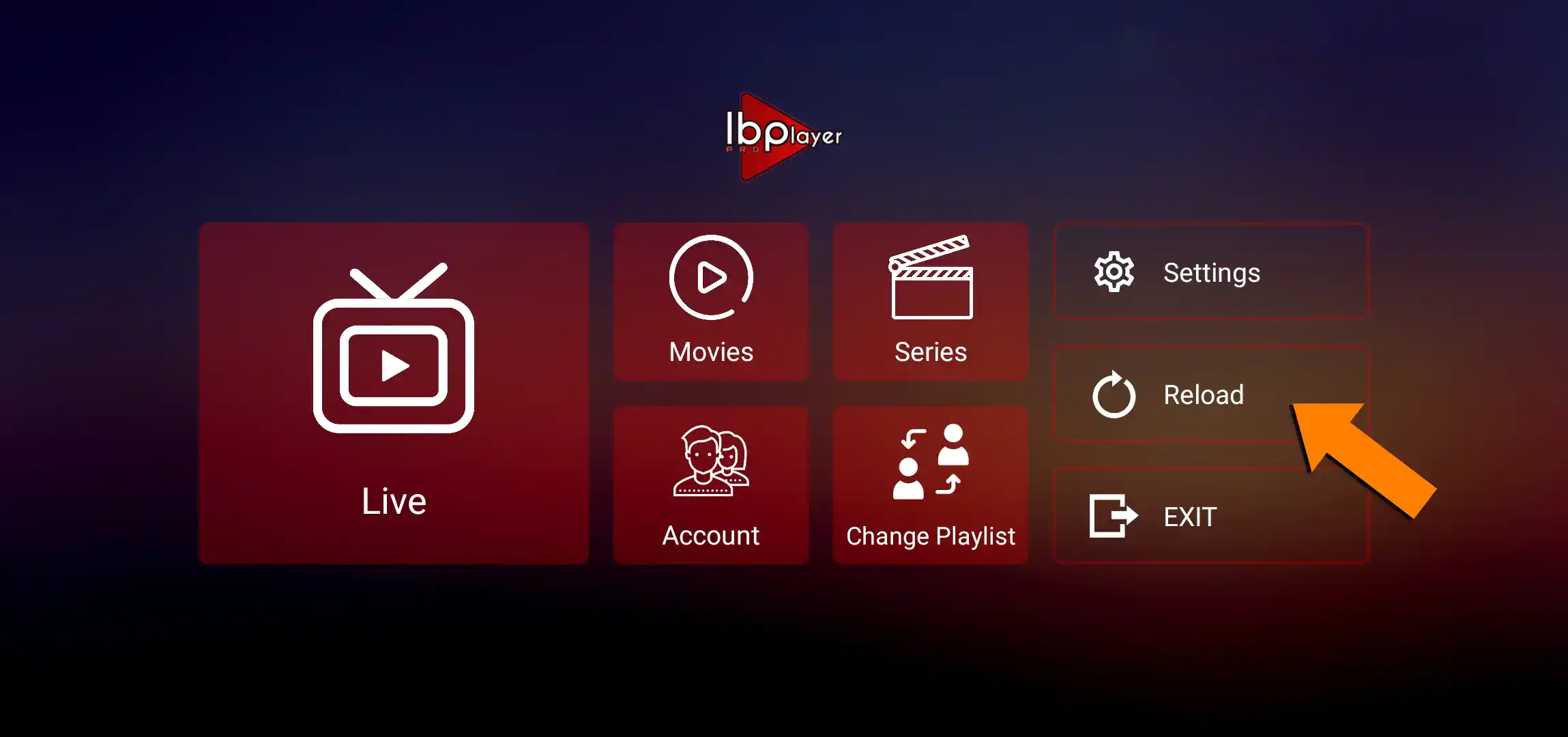
Close IBO Player Pro completely and reopen it. If the app is already open, tap Reload on the home screen to refresh your content.

IBO Player Pro home screen with the Reload button highlighted
2

Select Your Playlist

Go to Change Playlist and select the IPTV UK playlist. Your channels and content will load automatically.

IBO Player Pro playlist screen with the IPTV UK playlist selected
3

Browse & Enjoy

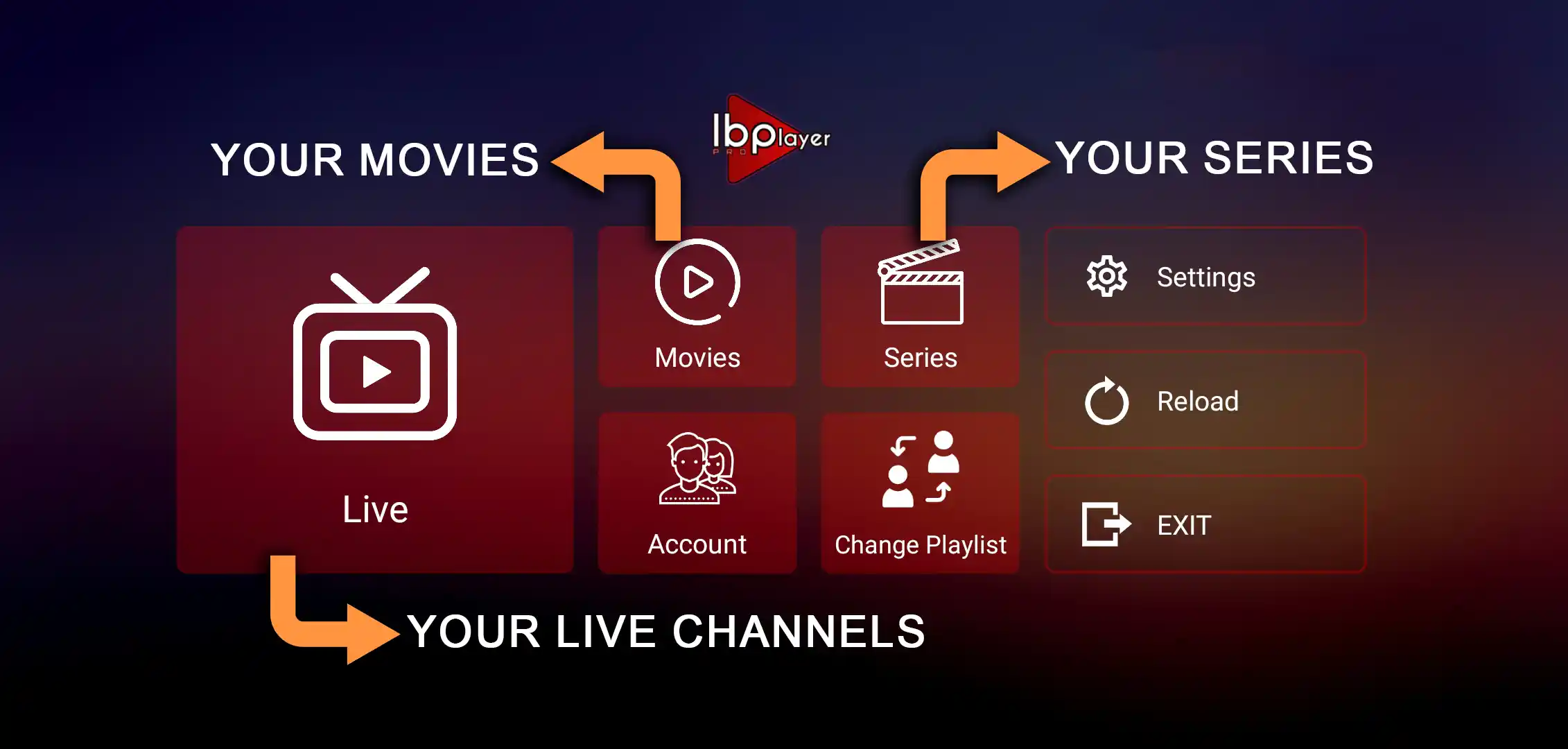
You’ll land on the IBO Player Pro home screen with everything ready. Live TV holds 25,000+ channels organised by country and category, Movies is the full on-demand library, and Series has complete season and episode listings. That’s it, you’re streaming.

IBO Player Pro home screen showing Live TV, Movies and Series sections
Manual · Xtream Codes

Set it up yourself

If you prefer to configure IBO Player Pro yourself using the Xtream Codes login details we sent to your email, here’s how:

1

Open Change Playlist

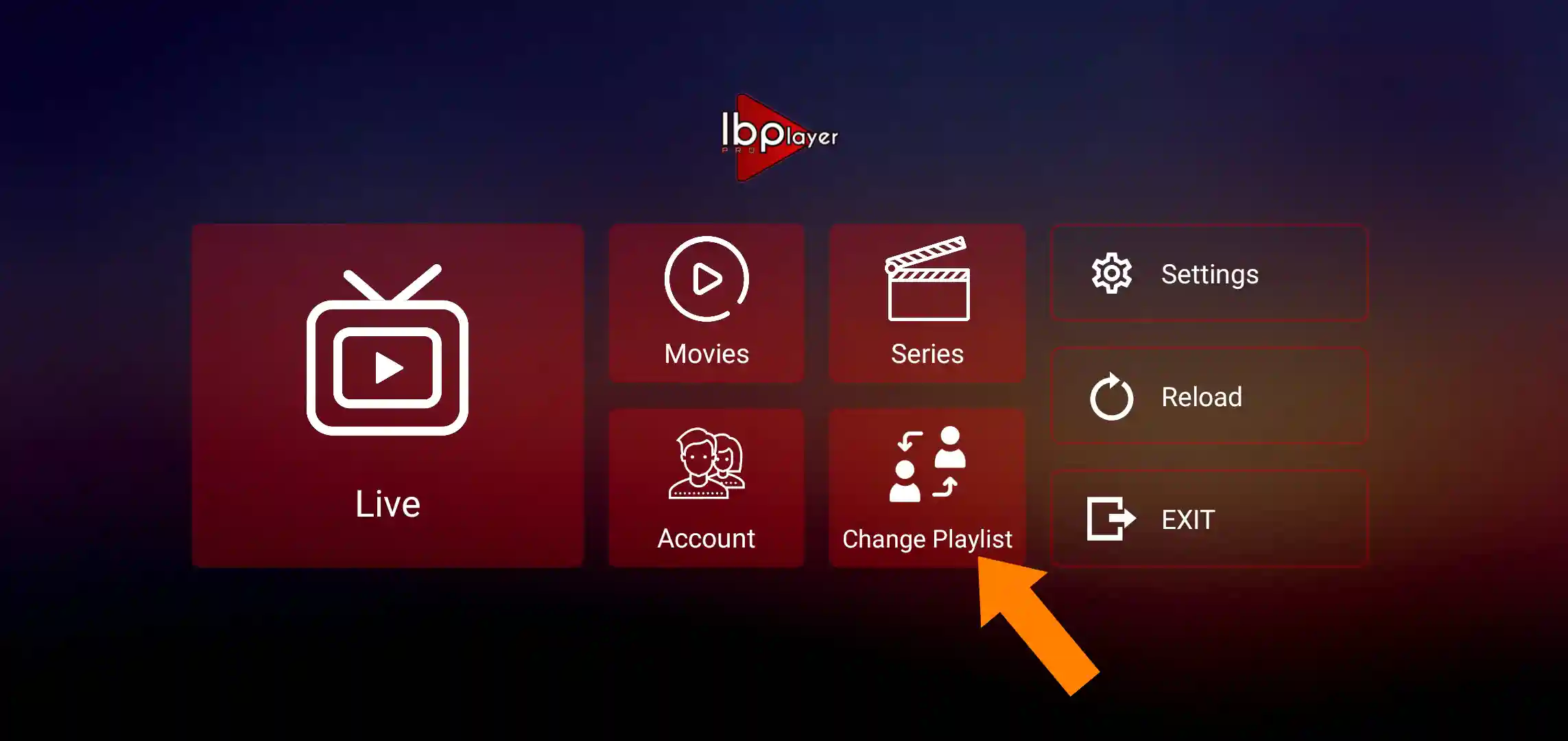
From the IBO Player Pro home screen, tap Change Playlist.

IBO Player Pro home screen with Change Playlist highlighted
2

Add Playlist

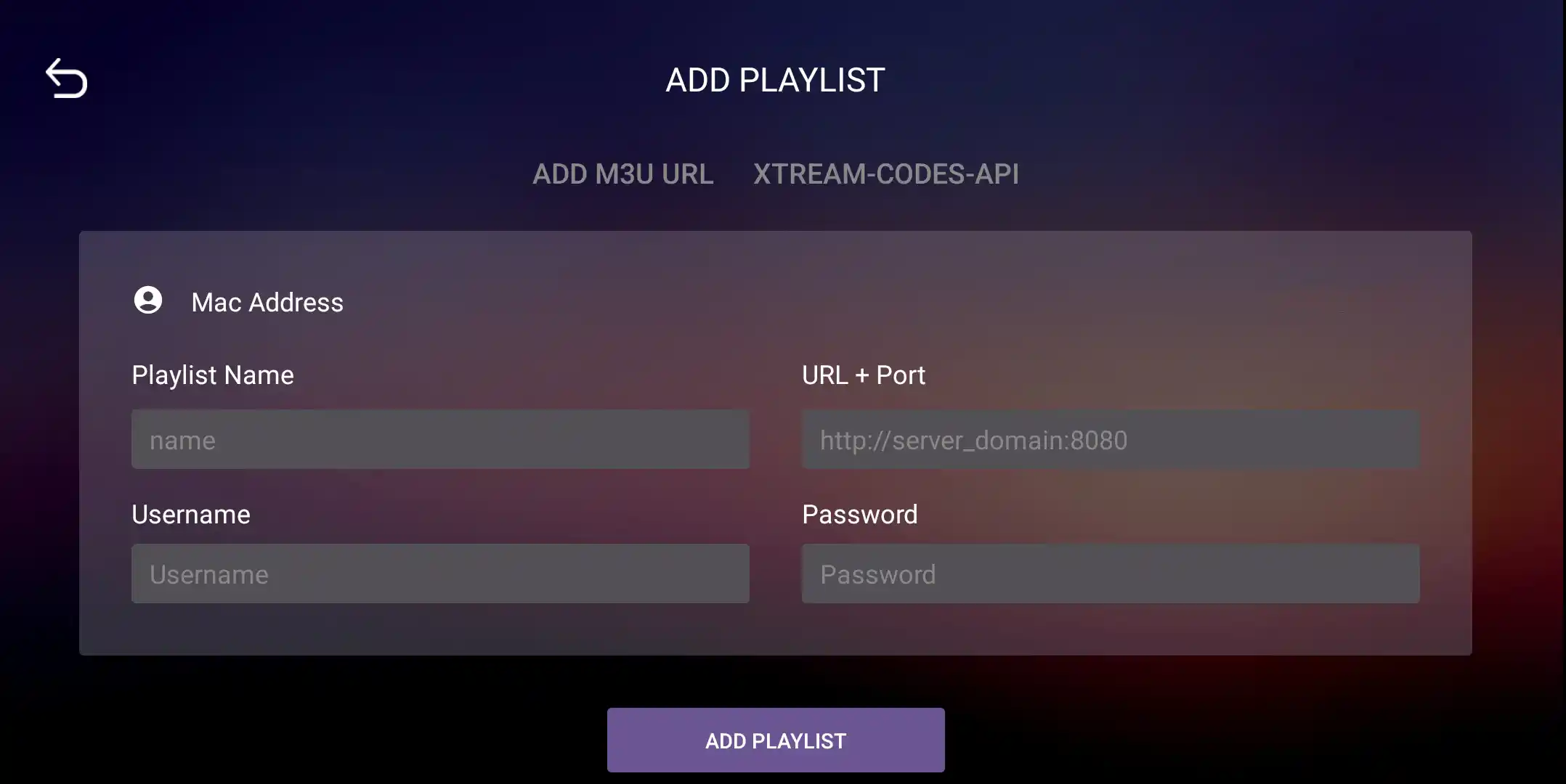
Tap Add Playlist, then select the Xtream-Codes-API tab. Enter the server URL, username and password from the email we sent you when you subscribed (check your inbox and spam folder).

IBO Player Pro Add Playlist screen on the Xtream Codes API tab
3

Save & Connect

Tap Add Playlist. You’ll be redirected to the M3U IPTV Playlists tab. Select our playlist (usually named IPTV UK), you’ll see it labelled as Protected. Tap on it, then press Connect. Your channels, movies and series will start loading automatically.

IBO Player Pro home screen with content loaded and ready

Having trouble? Our team can help activate the app using your MAC Address and Device Key.

Support specialist wearing a headset, ready to help with your IPTV setup

Need help with
your IPTV UK setup?

If something looks different on your screen, our team can talk you through it, from installing the app to opening your first channel. For setup, activation, billing or a quick question, real people are here to help.

Real humans. No bots, no AI scripts.

Order your IPTV UK subscription.

Setup assistance and your included IBO Player Pro licence come with your British IPTV plan.

Order Your IPTV UK Now